Showing posts with label portable software. Show all posts

Sunday, May 10, 2009

CamStudio V2.0


Synopsis: CamStudio is able to record all screen and audio activity on your computer and create AVI video files, then convert them into streaming Flash video files (SWF) using its built-in SWF Producer. It also supports anti-aliased screen captions as well as audio and video annotations.

Writes settings to: Application folder


How to extract: Download the installer and install to the default folder. Copy all files (except uninstall.exe and uninstall.ini) to a folder of your choice, then uninstall the program. Launch Recorder.exe.

Unicode support: No

License: Freeware/Open Source

System Requirements: WinNT / Win2K / WinXP

Download
Download “CamStudio V2.0”

NFReader


NFReader ist ein Feed-Reader, der RSS-, Atom- und RDF-Feeds unterstützt. Feeds und Gruppen von Feeds können in OPML-Dateien exportiert und aus diesen importiert werden.


Synopsis: NFReader is a simple newsfeed reader with RSS, Atom and RDF support. It also imports and exports OPML files.

Writes settings to: Application folder


How to extract: Download the RAR package and extract to a folder of your choice. Launch NFReader.exe.

Stealth [?]: Yes

Unicode support: No

License: Freeware

System Requirements: Win2K / WinXP

Download
Download “NFReader”

Tuesday, May 5, 2009

Free Portable Software JPEG & PNG Stripper V1.5.0.34


Category: Graphics - Processing (30)

Synopsis: JPEG & PNG Stripper is a tool for stripping/cleaning metadata (junk) from JPG, JPEG, JFIF and PNG files. The image quality is not affected.

Writes settings to: User profile folder. But given the nature of the application and the small number of settings it exposes, I think it can be accepted as portable.


How to extract: Download the ZIP package and extract to a folder of your choice. Launch Stripper.exe.

Stealth [?]: No

Unicode support: Yes

License: Freeware

System Requirements: Win95 / Win98 / WinME / WinNT / Win2K / WinXP / Vista

download

http://www.steelbytes.com/?mid=30
Download “Free Portable Software JPEG & PNG Stripper V1.5.0.34”

Wednesday, April 15, 2009

SilentNight Micro CD Burner : SilentNight Micro CD Burner


SilentNight Micro CD Burner is a tiny CD burner that lets you select the folder you want to burn to CD, with optional wildcard-based filtering. It supports long file names (Joliet filesystem) multi-session CDs, audio CDs from MP3/WAV files, Burn Proof/Just Link support etc.

Note: V5.0 is shareware with a "Light" version that can be used for free. All old functions from V4.x are 100% free to use, but new functions like VCD creation are only available in the registered version.

Latest: V6.0 has gone nagware, so I will stick with V5.0 until further notice. Direct download is provided for the last totally free version that I have, in case anyone wants it.

Writes settings to: Application folder


How to extract: Download the EXE file and copy to any folder of your choice. Launch the program by double-clicking on microburner.exe.

Unicode support: No

License: Freeware

System Requirements: Win95 / Win98 / WinME / WinNT / Win2K / WinXP

Download
Download “SilentNight Micro CD Burner : SilentNight Micro CD Burner”

dirhtml : Free Portable Software


Synopsis: dirhtml creates index.html files that lists the files in a folder (and subfolders), optionally including your own HTML code at any point in the generated files.

Note: As of v4.74, dirhtml supports Unicode but no longer supports Win95/98/ME. Thanks to Eric Nitzsche for the information.

Writes settings to: Application folder


How to extract: Download the ZIP file and extract to a folder of your choice. Launch dirhtml.exe.

Stealth [?]: Yes

Path portability: Requires manual entry of drive-less absolute path (eg. \docs\personal\work.doc without the drive letter)

Unicode support: Yes

License: Freeware

System Requirements: WinNT / Win2K / WinXP / Vista

Download

http://dirhtml.enware.info/
Download “dirhtml : Free Portable Software”

Sunday, April 5, 2009

iDailyDiary


iDailyDiary Free Version

iDailyDiary provides a simple interface that immediately gets you started taking daily notes, creating a journal, putting your thoughts into writing and much more.

The iDailyDiary editor is "richtext" with the ability to insert graphics, URL's, Hypertext links and links to other diary pages. iDailyDiary is fully searchable so you can always track down those important dates and reminders.

Key Features

Works with MS Windows 9x, ME, 2000, XP, 2003, Vista
Data files encrypted and password protected
Richtext Editor
Fully Searchable
Insert Pictures, URL's and Hypertext
Multiple "pages" for each day
Export to HTML format to create web pages
Supports Unicode (non-western character sets)
Mutli-Language GUI, including Chinese, Dutch, French, German, Italian, Turkish and Japanese

iDailyDiary Professional

The Professional version contains all the great features of the free version plus more:

Spell Checker and Thesaurus
Sticky Tabs, non-dated entries
Themes support (50+ themes included)
Create Templates
Print Multiple Pages or entire Diary
Print Headers and Footers (and other Print settings)
Export entire diary
Support for Tables
Insert Smileys
Insert/Store Files of any kind (including Audio and Video)
Manual Backup and Restore diary data files
Tree-View style Browser for diary entries, sticky tabs and templates
Set Diary to 'notebook' style (no dated entries)
As you type math calculator
All for just $30 (US)

download
http://www.splinterware.com/products/idailydiary.htm
Download “iDailyDiary”

Saturday, December 20, 2008

Mp3tag

Synopsis: Mp3tag is an editor for metadata of common audio formats (eg. ID3, Vorbis Comments, APE, MP4, TAK Loseless). It can rename files based on the tag information, replace characters or words from tags and filenames, import/export tag information, create playlists and more. The program supports online freedb database lookups for selected files, allowing you to automatically gather proper tag information for select files or CDs.

Writes settings to: Application folder. However it does write docking panel information to the registry.

Dependencies: GDIPLUS.DLL

How to extract: Download the installer and extract to a folder of your choice. Delete $PLUGINSDIR and [NSIS].nsi. Create a blank file in the same folder called mp3tag.cfg. Launch Mp3tag.exe.

Stealth: No

Unicode support: Yes

License: Freeware

System Requirements: WinXP / Vista

Website - Screenshot - Download
Download “Mp3tag”

SysExporter

Synopsis: SysExporter utility allows you to grab the data stored in standard list-views, tree-views, list boxes, combo boxes, text-boxes, labels, and WebBrowser/HTML controls from almost any application running on your system, and export it to text, HTML or XML file.
Writes settings to: Application Folder
How to extract: Download the ZIP package and extract to a folder of your choice. Launch sysexp.exe.
Stealth: Yes
Unicode support: No
License: Freeware
System Requirements: Win98 / WinME / WinNT / Win2K / WinXP / Vista

Website - Screenshot - Download
Download “SysExporter”

USBDeview

Synopsis: USBDeview is a small utility that lists all USB devices that currently connected to your computer, as well as all USB devices that you previously used. For each USB device, extended information is displayed: Device name/description, device type, serial number (for mass storage devices), the date/time that device was added, Vendor ID, Product ID etc. USBDeview also allows you to uninstall USB devices that you previously used, and disconnect USB devices that are currently connected to your computer. You can also use USBDeview on a remote computer, as long as you login to that computer with admin user.

Writes settings to: Application folder


How to extract: Download the ZIP package and extract a folder of your choice. Launch USBDeview.exe.

Stealth: Yes

License: Freeware

System Requirements: Win2K / WinXP / Vista

Website - Screenshot - Download
Download “USBDeview”

Password Safe (Twofish)

Synopsis: Password Safe is a password database for storing sensitive information in an encrypted form until the correct master password is entered. The database is encrypted with the Twofish encryption algorithm. You can copy a password into the clipboard and paste it directly into your application. Alternatively, Password Safe supports "Auto Type" that enters the username and password into the target application by simulating keystrokes.

Note that there is another application of the same name in the database that is totally unrelated with this entry.

Writes settings to: Application folder


How to extract: Download the ZIP package and extract to a folder of your choice. Launch pwsafe.exe.

Stealth: Yes

Unicode support: No

License: Freeware/Open Source

System Requirements: Win95 / Win98 / WinME / WinNT / Win2K / WinXP

Website - Screenshot - Download
Download “Password Safe (Twofish)”

Monday, December 8, 2008

PortableApps.com Suite™


PortableApps.com Suite™ is a complete collection of portable apps including a web browser, email client, office suite, calendar/scheduler, instant messaging client, antivirus, audio player, sudoku game, password manager, PDF reader, minesweeper clone, backup utility and integrated menu, all preconfigured to work portably. Just drop it on your portable device and you're ready to go.


Download “PortableApps.com Suite™”

PStart Version 2.11


PStart is a simple tray tool to start user defined applications. Designed to run portable applications (like portable Firefox & Thunderbird), you can start anything runnable from USB key devices or removable disks.
Install PStart locally to your hard disk to have an additional start menu with a quick program search feature.
Install PStart to your USB stick to launch portable applications easily and open important documents or folders.


PStart doesn't neccessarily have to be installed to your hard disk. Execute the installer and choose: you can install PStart to your local hard drive or a removable device.
Unlike Windows shortcuts, PStart uses relative paths, when installed as a portable application. If your USB key drive gets another drive letter when you insert it into another computer, your portable applications still can be started properly. This means you can also use PStart to start applications you burn to a CD (and don't know the drive letter either).
Of course not all applications are portable, but more and more software vendors notice, that people like the idea of carrying their applications with them. All future Pegtop applications will be portable (be patient). And there are portable versions of Firefox, Thunderbird, or even software development suites like Eclipse. PStart is 100% freeware, which means you can use it without having to pay, without any advertisements, and without other disadvantages (no spyware, no hidden costs).Of course you are allowed to link to this website, but you must neither publish this product elsewhere nor provide a direct download link without permission.
download 100% free
Download “PStart Version 2.11”

Wednesday, December 3, 2008

cdrtools Frontend V1.3.3


Synopsis: cdrtools Frontend is a GUI frontend for the command-line based cdrtools for authoring CDs. It supports the creation of data, audio and video CD (including data and video DVD).


Writes settings to: Application folder


How to extract: Download the self-extracting "portable" package and extract to a folder of your choice. Launch cdrtfe.exe.

Stealth: Yes

Unicode support: No

License: Freeware/Open Source

System Requirements: Win95 / Win98 / WinME / WinNT / Win2K / WinXP

load
Download “cdrtools Frontend V1.3.3”

Wednesday, November 26, 2008

Liquid War


Liquid War is a unique multiplayer wargame. Its rules are truely original and have been invented by Thomas Colcombet. You control an army of liquid and have to try and eat your opponents. A single player mode is available, but the game is definitely designed to be multiplayer, and has network support.

load

http://www.ufoot.org/liquidwar/v5

Download “Liquid War”

Tuesday, November 18, 2008

File Navigator V1.7.3.592


File Navigator V1.7.3.592 Suggested by BigD Posted on 18th November 2008 - 1MB


Category: Files - Managers
Synopsis: File Navigator is a Norton-Commander clone with a dual-pane text-based interface with a command prompt for you to enter DOS commands directly. Though the website is in Russian, the program itself is entirely in English.
Writes settings to: Application folder. To enable this, select the menu items "Commands" followed by "Configuration". Then click on the "Compatibility" tab and check "Store configuration in the INI-file".
How to extract: Download the ZIP package and extract to any folder of your choice. Launch the program by double-clicking on Fn.exe.
Unicode support: No

License: Freeware
System Requirements: Win95 / Win98 / WinME / WinNT / Win2K / WinXP

load
Download “File Navigator V1.7.3.592”

Friday, November 14, 2008

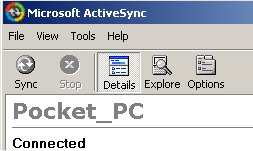
Portable Microsoft ActiveSync v4.5 - PocketPC (PPC)


Portable Microsoft ActiveSync v4.5 - PocketPC (PPC)
Microsoft ActiveSync v4.5 Portable for PocketPC (PPC)
Microsoft ActiveSync v4.5 Portable is a breakthrough, as it's totally portable, and no need to install on PC!Use anywhere, anytime...just transfer to your USB storage stick, and plug-in & click, wherever you are! No Install needed!Annoyed of not being able to use active sync on other pc with user restrictions (like at school)? Here is the solution.It leaves traces on host computer. If you want to delete traces browse to Documents and Settings/App Data/Thinstall. Otherwise This works with no installation on guest accounts. To stop application, as activesync doesnt have an exit button, you will need to use task manager to end process wcescomm.exedownload Microsoft ActiveSync v4.5 Portable - PocketPC (PPC)on rapidshare
Download “Portable Microsoft ActiveSync v4.5 - PocketPC (PPC)”

Wednesday, November 12, 2008

XMedia Recode 2.0.8.3

XMedia Recode 2.0.8.3
Aktualisierung von x264(1019) Codec
Neue Funktionen
20 neue Profile( PS3, XBox360, Cowon A3 ...)
Import: E-AC3, WPL
Export : OGG
MPEG TS Format unterstützt AAC und AC3
VOB Format unterstützt die Auflösung (720x480, 704x480, 352x480, 352x240)
Farbkorrektur(Helligkeit, Kontrast, Gamma, Farbton, Sättigung)
Fehlerbehebung
es wird nicht die Eingestellte Video-Birtate zum kodieren verwendet.
beim H264 Codec ist die Option "Video kopieren" immer verfügbar.
verbesserte Erkennung der DVD-Struktur
Download “XMedia Recode 2.0.8.3”

Friday, October 31, 2008

Disspy Lite 3.0.0

Disspy Lite 3.0.0 ReviewFREE Spyware and Adware removal software. Main software features:Scan ? Disspy scans memory, registry keys and values, cookies, files and folders for all known Data-mining, KeyLoggers, Hijackers, Dialers, Spyware, Adware, Browser Helper Objects, Spyware cookies, aggressive advertising and other tracking components. Removal ? Disspy removes all found adware/spyware threats from your computer. Selected files can be removed permanently or backed up in restore bin. Backup ? Disspy can backup all removed files so that they can be restored at any time, if necessary. List of backuped files is presented in restore bin. Restore ? Disspy can restore all backuped files in case that removal made some dependent program(s) stop working. Disspy will restore files right back from where they were originally removed from. This feature makes Disspy the top class system and data crash-free software. Exclude - Disspy enables its? users to create an exclusion list for the items that they will allow to reside on their computers. Update ? Our experts are updating program database almost daily. By downloading latest database versions and other updates, Disspy users can be sure that they are fully protected at all times. User can choose to be alerted whenever a newer database version is available for download. News & Tips ? Using Disspy info panel, users are able to receive all latest news related to new Disspy®?s features and other important news about spyware/adware and their removal.On line customers support ? All Disspy users have 24 hours non-stop open support center where they can post (ticket) all their comments, problems, questions, recommendations, etc? Combined with knowledge base, also available on-line, users are sure that they will have all their questions answered. Low hardware requirements - Disspy is not a demanding software and it is executive even on 333 MHz Pentium I computers with no more than 64 MB of RAM memory.Requirements: 333 MHz Pentium I, 64 MB RAM


Publisher :H-Desk Software Group
OS :Win98,Windows2000,WinXP
Size :2.38 MB
License :Freeware

load
Download “Disspy Lite 3.0.0”

Tuesday, August 19, 2008

EditPad Lite V6.4.1


EditPad Lite is a general-purpose text editor, designed to be small and compact, yet offer all the functionality you expect from a basic text editor. EditPad Lite works with Windows NT4, 98, 2000, ME, XP and Vista.

Synopsis: EditPad Lite is a small and compact general-purpose text editor. It allows you to open many files simultaneously, and switch between them using tabs. It also supports many functions for text manipulation and conversion.
Writes settings to: Application folder
How to extract: Download the installer and install to the default folder using the "No questions asked" option. Then copy EditPadLite.exe and EditPadPro.chm to a folder of your choice. Finally, uninstall the application. Create a blank file called RemovableDrive.sys in the same folder. Launch EditPadLite.exe.
Stealth: Yes
Unicode support: Partial. Able to display Unicode text with the right font chosen, but unable to handle files with Unicode filenames.
License: Free for non-commercial use
System Requirements: Win95 / Win98 / WinME / WinNT / Win2K / WinXP / Vista
Download “EditPad Lite V6.4.1”

Friday, July 25, 2008

Portable Your Uninstaller PRO 6.1.1250

Portable Your Uninstaller! PRO 2008 6.1.1250 Size: 4 MBYour Uninstaller! uninstaller software is the industry’s leading uninstaller software. It’s the world’s 1st smart Drag&Uninstall™ uninstaller software under the Windows platform, works on all Windows versions including Windows Vista/XP/2000/ME/98/95/2003. It’s as easy as using the recycle bin. Imagine! Just a drag-drop and the program you don’t want will disappear from your computer - as well as everything the unwanted program brings! Your Uninstaller! is a user-friendly way of removing unneeded applications on your computer. It can even remove some annoying spywares!Your Uninstaller! software is a specially designed uninstaller program for both beginning and advanced users. Your Uninstaller! 2006 is extremely very fast and easy to use. It has a unique ability to uninstall items by simply dragging programs’ icons into the Your Uninstaller! icon. You may also find the application you want to uninstall through a unique search function.Your Uninstaller! completely removes applications so quickly. Your Uninstaller! starts up 500%-1000% times faster than other Add/Remove programs. As you know, there are many installers in the world, such as InstallShield, Wise Installer, Microsoft Installer and many others. Most applications are built using these installers. Each installer has a unique install database, which makes it difficult to find all the changes programs’ make to your computer. That’s why other uninstallers can only uninstall part of an application-leaving some files and registry keys.To solve this problem, Your Uninstaller! uses it’s unique technique: SmartUninstall™. SmartUninstall™ has a database containing information about all installers on the market; so when it uninstalls a program, it automatically detects which installer the application used, then it simply uninstalls the application properly. That’s the reason Your Uninstaller! can detect and completely remove all the programs and icons on your computer.

load
Download “Portable Your Uninstaller PRO 6.1.1250”