Showing posts with label Uncategorized. Show all posts

Sunday, April 5, 2009

Defraggler V1.08.132


Defrag Individual Files
Most defragmentation tools only let you defrag the whole drive. Defraggler gives you the power to select individual files and folders to defrag. So you can get the job done in seconds, rather than waiting for the whole drive to complete. Of course if you want to defrag the whole drive Defraggler will let you do that too.
Compact and Portable
Defraggler was written in the same compact architecture as other Piriform products (CCleaner and Recuva). This results in a compact single EXE application, which can be copied to a thumbdrive and then used whenever you need it, without a complex installation process. The EXE itself is less than 1MB!
Vista Support
Defraggler supports all OSs released since Windows 2000, this includes Windows 2000, 2003, XP and Vista. 64-bit support has also just been added! Additionally Defraggler supports both NTFS and FAT32 file systems.
Locate Files on the Drive
After analysis Defraggler lists all the fragmented files on the drive. Selecting one or many will highlight their location on the disk. Allowing you to visually see the location of files on the disk.
Freeware
Why pay hundreds of dollars for a commercial defragmentation tool, when you can use Defraggler for free! This includes corporate use as well!


download
http://www.defraggler.com/download
Download “Defraggler V1.08.132”

Monday, June 16, 2008

SiteShoter v1.15


Description
SiteShoter is a small utility that allows you to save a screenshot of any Web page into a file. It automatically creates hidden window of Internet Explorer, loads the desired Web page, and than save the entire content of the Web page into an image file (.png, .jpg, .tiff, .bmp or .gif). You can use SiteShoter in user interface mode, or alternatively, you can run SiteShoter in command-line mode without displaying any user interface.
System RequirementsThis utility works on Windows XP, Window 2003 Server, and Windows Vista. You can also use this utility in Windows 2000, if GDI+ is installed.
Versions History
Version 1.15
Added support for handling a sequence of URLs, saved in a text file. (The URLs should be delimited by CRLF)
Version 1.10
Added support for automatically saving the URL in filename (%url%)
Added AutoComplete for filename field.
Version 1.09
Added support for current date/time Formatting in the save filename.
Version 1.08
Added new option: Cut Web page in the specified location.
Version 1.07
Added AutoComplete support for the URL text-box.
Fixed bug: Accelerator keys didn't work...
Version 1.06
Fixed a GDI resources leak.
Version 1.05
New option: Automatically extend browser size according to Web page
Version 1.00 - First release.
Known Problems
Currently, SiteShoter cannot capture the content of Java applets, and possibly some other 3-party components
Using SiteShoter
SiteShoter doesn't require any installation process or additional DLL files. In order to start using it, simply run the executable file (SiteShoter.exe) After you run it, type the URL of the Web page that you want to capture, and select the image filename that you want to save. You can also modify the other options, like browser width/height, disable Flash, and so on. Click the 'Start' button and wait a few seconds until the Web site is loaded and saved into a file. (The default timeout value is 10 seconds, you may change it according to your needs)
Download “SiteShoter v1.15”

Thursday, April 24, 2008

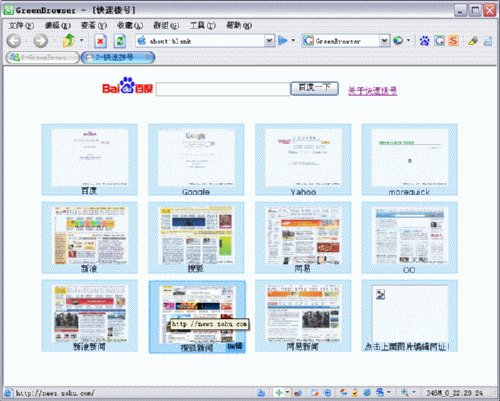
GreenBrowser V4.5


AD Filter, Mouse Gesture, Mouse Drag, Auto Fill Form, Auto Scroll, Auto Refresh, Auto Save, Auto Hide, Search Bar, External Toolbar, Collector, Page Manager, Download Manager, Group, Plugin, Skin, Proxy, Start Mode, URL Alias, Quick Key, Link List, Status Bar Setting, Sort Save Page, Clean System, Page Download Control, Page Zoom, Page Background Color...

4.5.0423
add: group show favicon
Fix: sometimes can not show flash
Fix: sometimes can not show scrollbar
Fix: add to group bug
Fix: group toolbar bug
Fix: favorite order bug
Fix: sometimes activex can not input
Fix: status bar https protocol icon bug
Fix: active order of the tab
Fix: monitor position bug
Fix: flying ad filter bug
Improved: popup filter effect


HomePage

Download
Download “GreenBrowser V4.5”

Sunday, March 9, 2008

Portable Newspeak

Portable Newspeak is Newspeak Cocoa IRC client for Mac OS X packaged as portable application so you can carry around with you on any portable device, USB thumb drive, iPod, portable hard drive,memory card, other portable device (also on your internal hard disk) as long as it has 2 MB of free space and use on any Mac OS X computer, taking your IRC servers, channels list and saved transcrip with you.
Download “Portable Newspeak”

Tuesday, January 1, 2008

Money Manager Ex 0.8.0.8


Money Manager Ex© is a easy-to-use personal finance software. It primarily helps organize one’s finances and keeps track of where, when and how the money goes. It is also a great tool to get a bird’s eye view of your financial worth. It includes all the basic features that 90% of users would want to see in a personal finance application.
Release Highlights:
  • Custom SQL Query Tool to create custom reports
  • Add % to actual/estimated amounts in Budget report (Juraj)
  • Reconciled balance incorrect for cross currency transactions (Shippers)
  • Fix transactions when viewed descending (Patch from Igor)
  • Add automatic Transaction Number (Patch from Igor)
  • Allow !Bank Qif import (Johnny Mac)
  • Fix funky DataFormat setup in Options dialog(Prerelease 1 through 4)
  • Fix crash when pressing CTRL+R in account screen
  • Add pie charts for categories
  • Fix bug where favorite accounts were not being displayed correctly (Jota)
  • Reconciled balance should show initial balance correctly(Jota)
  • Add support for split categories in a single transaction
  • Add Income vs Expenses and Top Categories Graphical Reports
  • Add automatic stock price download for various stock exchanges supported by Yahoo(Patch submitted by Greg Newton)
  • Fix Bug 1625307: Account Balances Length not showing full amount without refresh
  • Fix Bug 1695918: Language Selection Button shows blank text when canceled
  • Add Feature 1695853: Add Indicator that indicates Future Entries in the Register* Add Income/Expense views for Budgeting Panel
  • Add extension for Univ CSV template files
  • Fix Bug: Not show closed accounts in account summary and in report summary
  • Add view of transactions for current month and last month
  • Fix Multicurrency Bug in homepage (George)
  • Support exporting transfers to CSV files(Only from accounts will show it as transfer. Importrequires exact account names to be available for it to work)
  • Fixed Bug causing crash when account was deleted with pending bills and deposits
  • Use new icons for MMEX
  • Fix bug in amount reported by split transaction in report (drazx, Fortuna)
  • Allow flexible date formats in Date options (Samer)
  • Add Color option for future dates
  • Cleaner HTML formatting for summary and all reports (Patch submitted by Paulo Lopes)
  • Add new reports for expenses/income/categories
  • Fix bug with graph formatting
Homepage - TheZeal
Size: 3.0 MB
Download “Money Manager Ex 0.8.0.8”